Salesforce CRM Review 2026: Is It Still the #1 CRM Software?
Last Updated: February 2026 | Expert Review | Rating: ⭐⭐⭐⭐½ (4.5/5)
Quick Summary
Salesforce CRM is the world’s leading Customer Relationship Management platform, trusted by over 150,000 businesses worldwide. Launched in 1999, it dominates the global CRM market with a 21.7% market share. In this in-depth Salesforce CRM review, we cover its features, pricing, pros, cons, and who it’s best for — so you can decide if it’s right for your business in 2026.
Bottom Line: Salesforce is the most powerful and customizable CRM available today. Best for mid-to-large enterprises with complex sales needs. May be overkill (and too costly) for very small businesses.
Table of Contents
- What is Salesforce CRM?
- Who is Salesforce Best For?
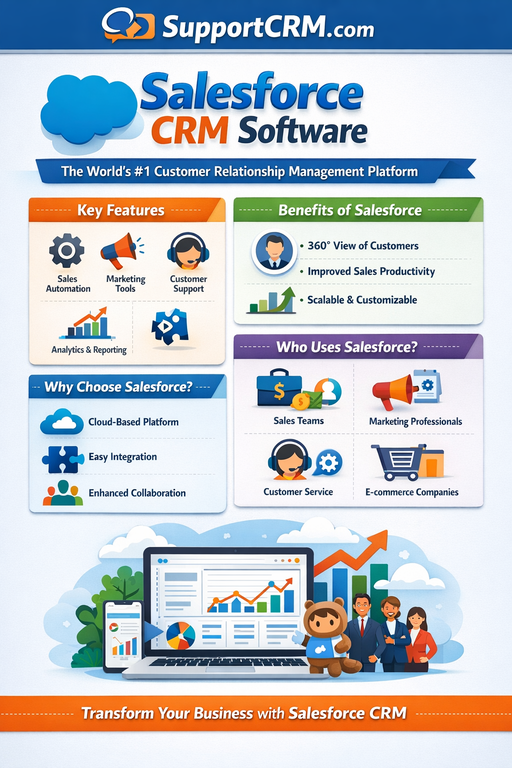
- Key Features
- Salesforce Pricing Plans 2026
- Pros and Cons
- Salesforce Agentforce & AI Capabilities
- Integrations & AppExchange
- User Reviews & Ratings
- Salesforce vs Competitors
- Final Verdict
- FAQs
What is Salesforce CRM? {#what-is-salesforce}
Salesforce CRM is a cloud-based customer relationship management platform that helps businesses manage sales pipelines, marketing campaigns, customer service, and business analytics — all from a single unified system.
Founded in 1999 by former Oracle executive Marc Benioff, Salesforce pioneered the concept of Software-as-a-Service (SaaS) CRM. Today, it offers an entire ecosystem of cloud products including:
- Sales Cloud – Core CRM for sales teams
- Service Cloud – Customer support management
- Marketing Cloud – Multi-channel marketing automation
- Commerce Cloud – E-commerce management
- Einstein AI / Agentforce – AI-powered automation and agents
- Nonprofit Cloud – Tailored for nonprofit organizations
Official Website: https://www.salesforce.com
Who is Salesforce CRM Best For? {#who-is-it-for}
Salesforce is the right choice if you are:
- A growing SMB or large enterprise with complex sales and marketing needs
- A data-driven company that requires powerful reporting, AI, and analytics
- A business that needs deep customization and unique workflows
- A team that relies on multiple third-party software integrations
- An organization that wants a scalable CRM that grows with you
Not ideal for: Freelancers, micro-businesses, or teams with a tight budget who only need basic contact management.
Key Features of Salesforce CRM {#key-features}
1. 📊 Lead & Opportunity Management
Salesforce’s lead management system captures, assigns, and tracks leads through every stage of the sales pipeline. When a lead is converted, it automatically populates data into Opportunities, Accounts, and Contacts — eliminating manual data entry and improving sales efficiency.
2. 🤖 Einstein AI & Predictive Analytics
Salesforce’s Einstein AI provides predictive lead scoring, automated insights, and sales forecasting. It analyzes patterns across your sales, marketing, and service data to identify high-priority leads, forecast outcomes, and recommend the best next actions to close deals faster.
3. 🔄 Flow Builder – Workflow Automation
The Salesforce Flow Builder is a visual, no-code automation tool that lets you create automated workflows for every stage of the customer journey — from lead capture to post-sale follow-up — putting your entire sales process on autopilot.
4. 📈 Customizable Reports & Dashboards
Salesforce offers one of the most powerful reporting engines in CRM software. You can build fully custom dashboards with drag-and-drop widgets, choose visualization types, track specific KPIs, and receive automated real-time updates. Ideal for sales leaders who need instant business intelligence at a glance.
5. 👥 Contact & Account Management
Salesforce stores a 360-degree view of every customer, including communication history, key contact details, advertising behaviors, interaction history, and social data. This holistic view allows your team to personalize every interaction and identify cross-sell or upsell opportunities.
6. 🛎️ Service Cloud – Customer Support
Salesforce Service Cloud provides advanced tools for managing customer service cases, routing tickets, and resolving issues quickly. It integrates directly with Sales Cloud, ensuring seamless collaboration between sales and support teams for consistent customer experiences.
7. 📧 Marketing Automation (Salesforce Engage)
With Salesforce Engage, teams get real-time alerts when customers open emails, click tracked links, or engage with social media content — enabling timely, personalized outreach at scale.
8. 🔒 Enterprise-Grade Security
Salesforce includes Single Sign-On (SSO), multi-factor authentication (MFA), and IP restriction across all plans — making it one of the most secure CRM platforms available for enterprise use.
Salesforce Pricing Plans 2026 {#pricing}
All pricing is for Sales Cloud, billed annually per user/month. A 30-day free trial is available for most plans.
| Plan | Price (per user/month) | Best For |
|---|---|---|
| Starter Suite | $25 | Small businesses & startups |
| Pro Suite | $100 | Growing teams needing more tools |
| Enterprise | $165 | Complex sales processes |
| Unlimited | $330 | Maximum features & support |
| Einstein 1 Sales | $500 | Full AI + all Salesforce capabilities |
Key Pricing Notes:
- Salesforce does not offer a permanent free plan (unlike HubSpot or Zoho)
- Add-ons like advanced AI features, premium support, and additional cloud modules can significantly increase the total cost
- Enterprise implementations often cost $5,000–$15,000+ in setup and training costs
👉 View official Salesforce pricing here
Pros and Cons of Salesforce CRM {#pros-and-cons}
✅ Pros
- Unmatched customization — Nearly every aspect of the interface and workflow can be configured to your business needs
- Powerful analytics & reporting — Industry-best custom dashboards and sales forecasting
- Massive AppExchange marketplace — 5,000+ third-party integrations available
- Scalable for any business size — From startups to Fortune 500 companies
- AI-powered features — Einstein AI and Agentforce deliver cutting-edge automation
- Cloud-based & mobile-ready — Accessible from anywhere, ideal for remote teams
- Strong security — SSO, MFA, IP restriction included on all plans
- Unlimited contacts — Across all paid plans
- Rich support resources — Salesforce Trailhead, tutorials, community forums, and certifications
❌ Cons
- High cost — Starting at $25/user/month and reaching $500/user/month; expensive for small businesses
- Steep learning curve — Complex setup; may require dedicated Salesforce admins
- Lengthy implementation — Custom deployments can take weeks or months
- Add-on costs — Many advanced features require paid add-ons, inflating the total bill
- Customer support wait times — Some users report longer ticket resolution times
- Complexity for simple use cases — May be overkill for basic contact management needs
Salesforce Agentforce & AI Capabilities (2025–2026) {#ai-features}
One of the most significant recent developments in Salesforce is the launch of Agentforce, its next-generation AI platform.
In October 2025, Salesforce launched Agentforce 360 — a unified platform where AI agents, company data, and human employees work together to automate tasks and enhance customer experiences. Key highlights:
- Data 360 Layer — Connects structured CRM records with unstructured data like emails and PDFs into a single, real-time data layer
- Autonomous AI Agents — AI agents can act independently to resolve customer queries, follow up on leads, and complete routine tasks
- Cross-Cloud Integration — Agentforce 360 is currently available on Sales Cloud, Service Cloud, and Field Service Cloud
This positions Salesforce not just as a CRM, but as an AI-driven business automation platform for 2026 and beyond.
Integrations & AppExchange {#integrations}
Salesforce boasts one of the largest integration ecosystems of any CRM platform:
- AppExchange — Over 5,000 apps and integrations, including Slack, DocuSign, Mailchimp, Shopify, Google Workspace, and Microsoft 365
- Native API — Robust REST and SOAP APIs for custom integrations
- MuleSoft — Salesforce’s dedicated integration platform for connecting enterprise systems
- Outlook & Gmail — Native email sync for seamless communication tracking
👉 Browse the Salesforce AppExchange
User Reviews & Ratings {#user-reviews}
| Platform | Rating |
|---|---|
| G2 | ⭐ 4.5/5 (14,000+ reviews) |
| Capterra | ⭐ 4.4/5 |
| TrustRadius | ⭐ 8.3/10 |
| Software Advice | ⭐ 4.4/5 |
What users love:
- Robust customization and flexibility
- Powerful reporting and analytics dashboards
- Vast integration options via AppExchange
- Scalability as the business grows
Common complaints:
- High pricing and expensive add-ons
- Steep learning curve for new users
- Longer-than-expected implementation timelines
- Customer support response times
Salesforce vs. Top Competitors {#vs-competitors}
| Feature | Salesforce | HubSpot | Zoho CRM | Microsoft Dynamics 365 |
|---|---|---|---|---|
| Starting Price | $25/user/mo | Free / $15/user/mo | Free / $14/user/mo | $65/user/mo |
| Free Plan | No (30-day trial) | Yes | Yes | No |
| AI Features | ✅ Einstein + Agentforce | ✅ Breeze AI | ✅ Zia AI | ✅ Copilot |
| Customization | ⭐⭐⭐⭐⭐ | ⭐⭐⭐ | ⭐⭐⭐⭐ | ⭐⭐⭐⭐ |
| Ease of Use | ⭐⭐⭐ | ⭐⭐⭐⭐⭐ | ⭐⭐⭐⭐ | ⭐⭐⭐ |
| Integrations | ⭐⭐⭐⭐⭐ | ⭐⭐⭐⭐ | ⭐⭐⭐⭐ | ⭐⭐⭐⭐ |
| Best For | Enterprises | SMBs | Budget teams | Microsoft users |
Key Takeaway: Salesforce wins on depth, customization, and AI power. HubSpot and Zoho are better value for smaller teams or those on a tight budget.
Final Verdict {#verdict}
Should you use Salesforce CRM in 2026?
YES, if:
- You’re a mid-size to large enterprise with complex CRM needs
- You need best-in-class analytics, AI, and automation
- You require deep customization and a vast integration ecosystem
- You’re willing to invest in proper setup and training
NO, if:
- You’re a small business with a tight budget
- You need a simple, out-of-the-box CRM solution
- You want strong built-in marketing tools without add-on costs (consider HubSpot)
- You need a lower-cost alternative (consider Zoho or Freshsales)
Overall Rating: 4.5/5 ⭐⭐⭐⭐½
Salesforce remains the gold standard for enterprise CRM software. Its combination of deep customization, AI-powered automation (Agentforce), powerful analytics, and a massive integration marketplace make it unmatched for businesses with complex needs. For simpler use cases, more affordable alternatives may serve you better.
👉 Try Salesforce Free for 30 Days →
Frequently Asked Questions (FAQs) {#faqs}
❓ What is Salesforce CRM used for?
Salesforce CRM is used to manage customer relationships, sales pipelines, marketing campaigns, and customer service interactions from a single cloud-based platform.
❓ Is Salesforce free?
Salesforce does not offer a permanent free plan, but it does provide a 30-day free trial for most of its Sales Cloud editions.
❓ How much does Salesforce CRM cost?
Salesforce Sales Cloud pricing ranges from $25/user/month (Starter Suite) to $500/user/month (Einstein 1 Sales), billed annually.
❓ Is Salesforce good for small businesses?
Salesforce offers a Starter Suite designed for small businesses, but many find it expensive and complex compared to alternatives like HubSpot or Zoho CRM.
❓ What is Salesforce Agentforce?
Agentforce is Salesforce’s AI agent platform, launched in 2025, that enables businesses to deploy autonomous AI agents to automate customer service, sales tasks, and business workflows.
❓ What is Salesforce Einstein AI?
Einstein AI is Salesforce’s built-in artificial intelligence engine that provides predictive lead scoring, automated insights, sales forecasting, and smart recommendations across sales, marketing, and service teams.
❓ How does Salesforce compare to HubSpot?
Salesforce is more powerful and customizable, but more expensive and complex. HubSpot is easier to use, offers a free plan, and is better suited for marketing-driven SMBs.
❓ Does Salesforce integrate with other tools?
Yes. Salesforce integrates with 5,000+ apps via AppExchange, including Gmail, Outlook, Slack, Shopify, Mailchimp, DocuSign, and many more.
❓ What industries use Salesforce?
Salesforce serves virtually every industry, with specialized solutions for financial services, healthcare, retail, manufacturing, education, government, and nonprofits.
❓ Is Salesforce secure?
Yes. Salesforce includes enterprise-grade security features including SSO, multi-factor authentication, IP restriction, and data encryption across all plans.
Useful Resources & Links
- 🌐 Salesforce Official Website
- 💰 Salesforce Pricing Page
- 🆓 Start Your Free 30-Day Trial
- 📦 AppExchange – Integrations Marketplace
- 📚 Salesforce Trailhead – Free Learning
- 📞 Salesforce Support
- 🤖 Agentforce by Salesforce
This review is independently written and regularly updated. We may earn a commission if you purchase through our links, at no extra cost to you.
Last updated: February 2026